Routing New Developers to the Right Slack Channels
Role: Automations Engineer, Atrium Academy Client: Anonymous Client (with a course on Maven) Scale: 436 developers across 3 cohorts, 4 private channels each Stack: n8n, Slack API, Maven, Google Sheets, Tally
Overview
The client runs developer cohorts where each live in their own set of private Slack channels. Getting a new developer into the right channels used to be manual work, done by hand for every person, every channel, every cohort. I built an n8n system that does it automatically: when someone joins the Slack workspace, it looks up which cohort(s) they enrolled in and adds them to exactly the right channels, with fallbacks so nobody gets stranded when the data doesn't line up. Onboarding went from a recurring operations chore to something that just happens.
The problem
Each of the clients cohorts has four private Slack channels of its own. When a developer joined, someone on the operations side had to manually add that person to all four, and then repeat it for every new developer in every cohort. It was pure repetitive work, exactly the kind of thing that scales badly: more developers and more cohorts meant proportionally more clicking, plus a real chance of someone being missed or dropped into the wrong cohort's channels.
The obvious first fix, auto-adding every new joiner to one fixed set of channels, works right up until you run more than one cohort at a time. The moment two cohorts overlap (say a private client cohort and a public course running concurrently), a single hardcoded destination can't tell them apart, and you're back to sorting people by hand. So the real problem wasn't "add people to channels," it was "route each person to the correct cohort's channels, with multiple cohorts live at once."
The solution
The system has two halves: capture who belongs where, then route them there when they show up.
Capture (Maven to a master sheet). Enrollment happens in Maven, so I set up a single webhook that catches every enrollment event across all courses and logs it to a master Google Sheet (who enrolled, which course, which cohort, their email). That sheet is the source of truth for cohort membership.
Route (Slack join to the right channels). When a developer joins the Slack workspace, n8n looks their email up in the master sheet, reads which cohort(s) they enrolled in, and builds a route key in the form of Course::Cohort for each one. A Switch sends each route key to that specific cohort's channel set, and the developer gets added to exactly the right four channels. Because it keys off the enrollment data rather than a fixed destination, it handles as many concurrent cohorts as are running, with no reconfiguration between launches.
Here's a closer look at the main flow. When we get new user on the Slack community it's compared against our Maven enrollment log. It can then take two paths:
Happy - Email is on the log, they moved on to channel routing Unhappy - No record of their enrollment. route data to the Slackbot to notify ops team
When an item is ready for routing, I generate a routekey (the purple node) comprised of their course::cohort. For example, if I joined the second cohort of UHI, my routekey would be UHI::cohort2
I then use that to sort and fan out to the corresponding channels of that key.
Lastly, I route errors at the end to notify me of any failures with the exception of already in channel slack errors
A look at the overall workflow shape. It has 2 halves, with 2 separate triggers.
• Bottom left is the main area where initial Slack joins are compared against the Maven master log. • Top left is where Slack bot interactions flow in. • Right side is where developers are routed into their respective channels
Here's a closer look at the main flow. When we get new user on the Slack community it's compared against our Maven enrollment log. It can then take two paths:
Happy - Email is on the log, they moved on to channel routing Unhappy - No record of their enrollment. route data to the Slackbot to notify ops team
When an item is ready for routing, I generate a routekey (the purple node) comprised of their course::cohort. For example, if I joined the second cohort of UHI, my routekey would be UHI::cohort2
I then use that to sort and fan out to the corresponding channels of that key.
Lastly, I route errors at the end to notify me of any failures with the exception of already in channel slack errors
A look at the overall workflow shape. It has 2 halves, with 2 separate triggers.
• Bottom left is the main area where initial Slack joins are compared against the Maven master log. • Top left is where Slack bot interactions flow in. • Right side is where developers are routed into their respective channels
Here's a closer look at the main flow. When we get new user on the Slack community it's compared against our Maven enrollment log. It can then take two paths:
Happy - Email is on the log, they moved on to channel routing Unhappy - No record of their enrollment. route data to the Slackbot to notify ops team
When an item is ready for routing, I generate a routekey (the purple node) comprised of their course::cohort. For example, if I joined the second cohort of UHI, my routekey would be UHI::cohort2
I then use that to sort and fan out to the corresponding channels of that key.
Lastly, I route errors at the end to notify me of any failures with the exception of already in channel slack errors
A look at the overall workflow shape. It has 2 halves, with 2 separate triggers.
• Bottom left is the main area where initial Slack joins are compared against the Maven master log. • Top left is where Slack bot interactions flow in. • Right side is where developers are routed into their respective channels
Here's a closer look at the main flow. When we get new user on the Slack community it's compared against our Maven enrollment log. It can then take two paths:
Happy - Email is on the log, they moved on to channel routing Unhappy - No record of their enrollment. route data to the Slackbot to notify ops team
When an item is ready for routing, I generate a routekey (the purple node) comprised of their course::cohort. For example, if I joined the second cohort of UHI, my routekey would be UHI::cohort2
I then use that to sort and fan out to the corresponding channels of that key.
Lastly, I route errors at the end to notify me of any failures with the exception of already in channel slack errors
A look at the overall workflow shape. It has 2 halves, with 2 separate triggers.
• Bottom left is the main area where initial Slack joins are compared against the Maven master log. • Top left is where Slack bot interactions flow in. • Right side is where developers are routed into their respective channels
Handling the messy cases
Real onboarding data isn't clean, so the system has two safety nets.
The alias fallback. People routinely join Slack with a different email than the one they enrolled with, which means a straight lookup finds nothing. When that happens, the workflow checks an alias sheet that maps a person's Slack email to their enrollment email, and there's a method for adding new mappings to that sheet, so a mismatch becomes a quick fix instead of a dead end.
The Slack alert. If someone still can't be matched (not on the master sheet, and no alias), the workflow doesn't fail silently. It messages the team through a Slack bot, flagging that this person joined but couldn't be routed, so a human can step in. Nobody gets quietly stranded outside their cohort.
Here's an example of what the Slack bot looked like when it would output the individual's details as an alert.
There is a button at the bottom to message that indicidual. Once the email was updated, you can click Rerun Add to Cohort Channels, and it would re-enter them into the workflow to attempt another routing.
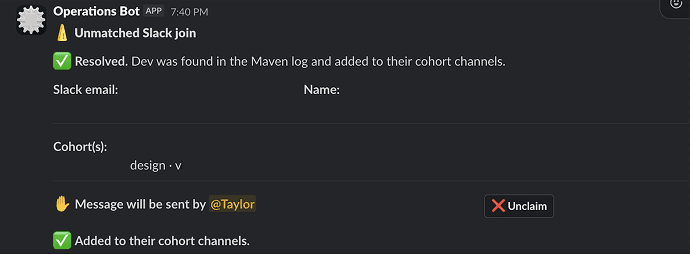
Once a dev was successfully routed via the Slackbot, the original message would change to this "success" message.
That way we can scan through the channel and ensure no one falls through the cracks
When an item wasn't found on the master log (no email), we'd receive an alert in a Slack channel with the details.
Here is the Slack block_kit button logic to handle messages being sent to the individual, and rerunning the check once the email was added
Here's an example of what the Slack bot looked like when it would output the individual's details as an alert.
There is a button at the bottom to message that indicidual. Once the email was updated, you can click Rerun Add to Cohort Channels, and it would re-enter them into the workflow to attempt another routing.
Once a dev was successfully routed via the Slackbot, the original message would change to this "success" message.
That way we can scan through the channel and ensure no one falls through the cracks
When an item wasn't found on the master log (no email), we'd receive an alert in a Slack channel with the details.
Here is the Slack block_kit button logic to handle messages being sent to the individual, and rerunning the check once the email was added
Here's an example of what the Slack bot looked like when it would output the individual's details as an alert.
There is a button at the bottom to message that indicidual. Once the email was updated, you can click Rerun Add to Cohort Channels, and it would re-enter them into the workflow to attempt another routing.
Once a dev was successfully routed via the Slackbot, the original message would change to this "success" message.
That way we can scan through the channel and ensure no one falls through the cracks
When an item wasn't found on the master log (no email), we'd receive an alert in a Slack channel with the details.
Here is the Slack block_kit button logic to handle messages being sent to the individual, and rerunning the check once the email was added
Here's an example of what the Slack bot looked like when it would output the individual's details as an alert.
There is a button at the bottom to message that indicidual. Once the email was updated, you can click Rerun Add to Cohort Channels, and it would re-enter them into the workflow to attempt another routing.
Once a dev was successfully routed via the Slackbot, the original message would change to this "success" message.
That way we can scan through the channel and ensure no one falls through the cracks
When an item wasn't found on the master log (no email), we'd receive an alert in a Slack channel with the details.
Here is the Slack block_kit button logic to handle messages being sent to the individual, and rerunning the check once the email was added
Impact
Eliminated the manual onboarding work. So far the system has routed 436 developers across 3 cohorts, and at four channels each, that's over 1,700 manual channel-adds that never had to happen by hand. Onboarding a developer went from a per-person, per-channel operations task to something that happens automatically the moment they join.
Made concurrent cohorts a non-event. Multiple cohorts can run at the same time without anyone touching the workflow, because routing is driven by live enrollment data rather than a hardcoded channel set.
Replaced silent failures with a safety net. The alias fallback catches the common email-mismatch case, and the Slack alert makes sure anyone who still can't be matched gets flagged to a human instead of slipping through unnoticed.